

How should we tell people what we’re doing?
In detail
- How do we ensure our processing by IoT products is transparent?
- How do we decide the right methods for providing privacy information?
- How do we make our privacy information easy to follow?
- What are the right moments for us to provide privacy information?
- How do we provide privacy information on different product interfaces?
- How do we provide privacy information if there are multiple users?
You must inform people that you intend to process their personal information.
Being transparent about your use of people’s personal information is closely linked to fairness. Your processing is unlikely to be fair if you do not give people information about it.
Regardless of the type of IoT product you use in your processing, you must tell users:
- why you are using their personal information;
- what lawful basis you are using for processing;
- what types of personal information you are using;
- what decisions you are making with the information and how it affects their use of your service;
- whether you keep personal information used or generated by your systems and for how long;
- whether and in what circumstances you share their personal information with other organisations; and
- how they can exercise their data protection rights.
You must provide privacy information to people at the time you collect their personal information from them. You could also give people privacy information ahead of time when you start your processing.
If your IoT product is aimed at children or likely to be accessed by them, you must ensure that the privacy information you give them – and other published terms, policies and community standards – is concise, prominent and in clear language suited to their age. You should provide additional specific ‘bite-sized’ explanations about how you use personal information at the point that use is activated.
How do we ensure our processing by IoT products is transparent?
When deciding how to comply with the transparency principle, you should consider:
- the most appropriate formats to deliver privacy information;
- the accessibility of your language;
- appropriate moments in a person’s user journey;
- different interfaces where people could receive privacy information; and
- who are the product users are (eg a single user vs multiple users, adults or children).
You must separate privacy information from terms and conditions, as well as any requests for consent to process personal information. You must not include a tick box to indicate consent with your privacy information.
You should make sure that privacy information is specific and relevant to an IoT product and the processing it does. You must provide privacy information for all its processing.
Example
A digital company manufactures and sells IoT products as well as operating an online video streaming service and email service.
The privacy information it provides for its IoT products is different to that of its two other services because the personal information it processes is different. Its IoT products process information from the product sensors that includes, for example, health and biometric information. Therefore, the company has three different sets of privacy information for its users, specific to each service.
You should make it easy for people to find privacy information again once they have set up the device.
For example, you could provide access to privacy information in the product’s settings or in a privacy dashboard – a dedicated section where people can manage what’s happening to their personal information.
You should be transparent about why you are requesting permissions to use different types of information. It is not enough to explain what information you need, you must explain why you need it. Including information about actions you won’t take may help clarify your intentions.
Example
The manufacturer of smart home lighting products designs its accompanying mobile app to allow the user to configure the lights to automatically turn off when they leave home.
To do this, the app needs permission to access the mobile device’s location services so it can detect when the user exits a pre-defined geofence.
The manufacturer discovers that the required location permission is bundled with other functions, such as access to precise GPS data and the ability to track location continuously in the background. This means the app could potentially collect more detailed location data than is necessary for the original purpose (such as tracking the user’s movements throughout the day).
To address this risk, the manufacturer defines what information it needs and makes sure the app only collects that information and nothing else.
It includes clear statements about this in appropriate places, including its privacy policy and app store listing.
The manufacturer also makes it clear through a just-in-time notice, by showing the same information to the user before the processing starts.
How do we decide the right methods for providing our privacy information?
When deciding how to provide privacy information, you should consider how people will interact with your IoT product and the wider context of its use. This will help you work out the most effective way of informing them.
Privacy notices are a useful way to communicate privacy information but may not be the most appropriate for all instances in the context of IoT. Where appropriate, you should consider other techniques alongside a notice. This will help you demonstrate you’ve taken steps to communicate privacy information in ways that people are likely to notice and use.
You should use various techniques such as ‘just-in-time’ (JIT) notices or a layered approach, where appropriate.
You could provide a dedicated privacy and security hub where people can find privacy information.
But you should be careful not to overload them with information. You should consider if people are likely to read what you provide and the circumstances in which they do so. You could have a concise privacy information resource, for example as part of the JIT notice, and refer users to the privacy hub if they want more information. 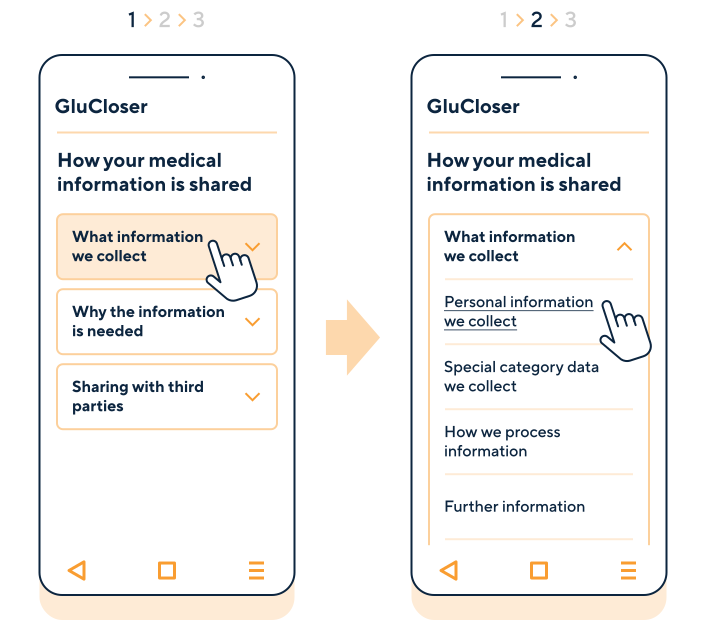
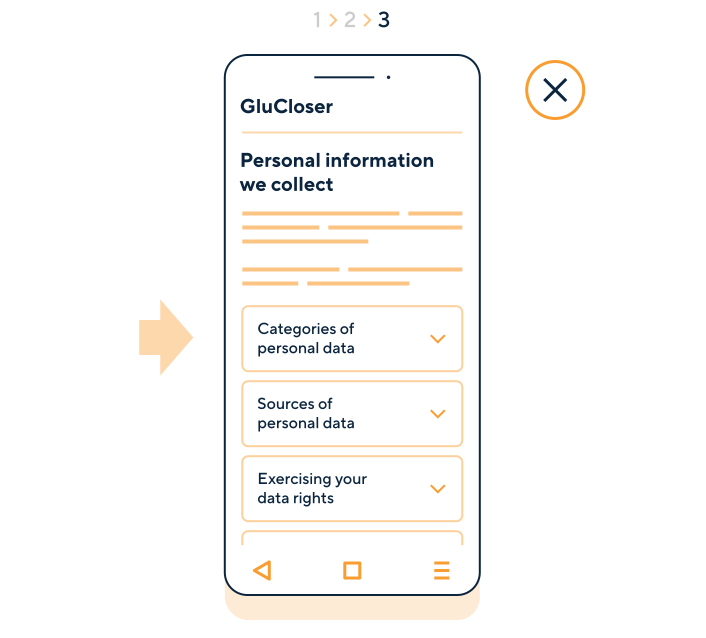
A graphic showing three screens of an accompanying app for a smart glucose monitor. The first screen shows the first layer of a privacy notice explaining how medical information from the glucose monitor is shared. It includes three sections with content that the user can expand to get more information about what information the product collects, why the information is needed and how it's shared with third parties.
The second screen displays a second layer after a user clicks on the section about what information the glucose monitor collects. It includes more links to personal information and special category data the organisation collects, how it processes the information and sections for further information and more resources. The third screen shows more expandable sections with content about categories of personal information, sources of personal information and exercising user rights after a user clicked on the link with personal information that the organisation collects. This layered notice provides information to the user in a complex way which makes it ineffective. This example uses a harmful design pattern called 'privacy maze'.
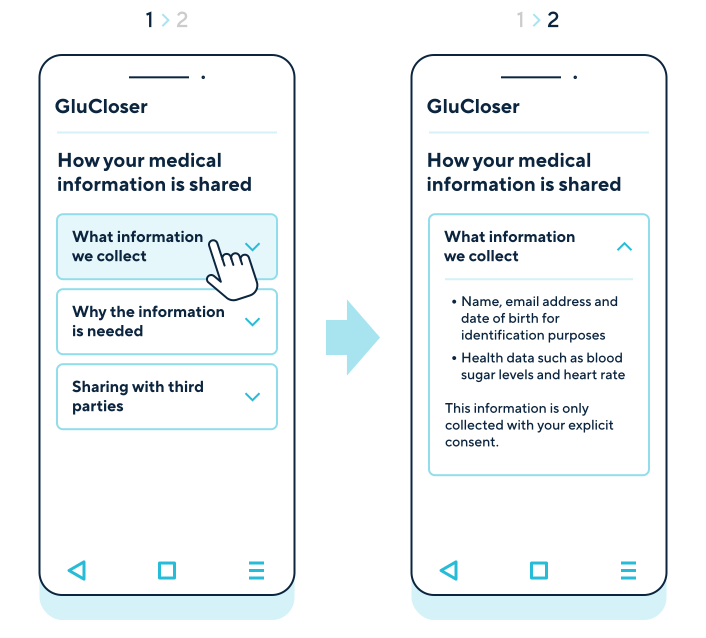
A graphic showing two screens of an accompanying app for a smart glucose monitor. The first screen shows the first layer of a privacy notice explaining how medical information from the glucose monitor is shared. It includes three sections that the user can expand to get more information about what information the product collects, why the information is needed and how it's shared with third parties.
The second screen displays a second layer of the notice after a user clicks on the link about what information the glucose monitor collects. It includes a list of specific types of personal information the glucose monitor processes - name, email address and date of birth for identification purposes, health data such as blood sugar levels and heart rate. Providing more detailed information on the second layer ensures that the user can effectively access privacy information without having to trail through complex notice layers. This example strikes a balance between adding layering to prevent information overload and introducing too much friction that would make it difficult to find important information.
How do we make our privacy information easy to understand?
You should design your privacy information in a way that enables people to understand what happens to their personal information. This helps you demonstrate your compliance with the UK GDPR’s transparency principle and people’s right to be informed.
You should make your privacy information easy to read and understand. You must make it concise, transparent, intelligible and easily accessible, using clear and plain language.
You should think about the people you address the information to. Putting yourself in their position can help you understand their level of knowledge and whether they may also have particular needs. This can impact not just what you tell them but also how you do so.
Where appropriate, you should make your privacy information more effective by:
- using combinations of audio and visual aids, including navigation panels, collapsible lists, bullet points, large text, pictures, diagrams, videos and subtitles to deliver your privacy information; and
- accommodating people with particular needs (eg providing the information in ways that are compatible with assistive technologies like screen readers and using (or enabling the use of) easy-to-perceive colours to display the information).
If you offer more than one IoT product or service, you should provide privacy information across various products and services in a consistent way that is appropriate for the specific product or service.
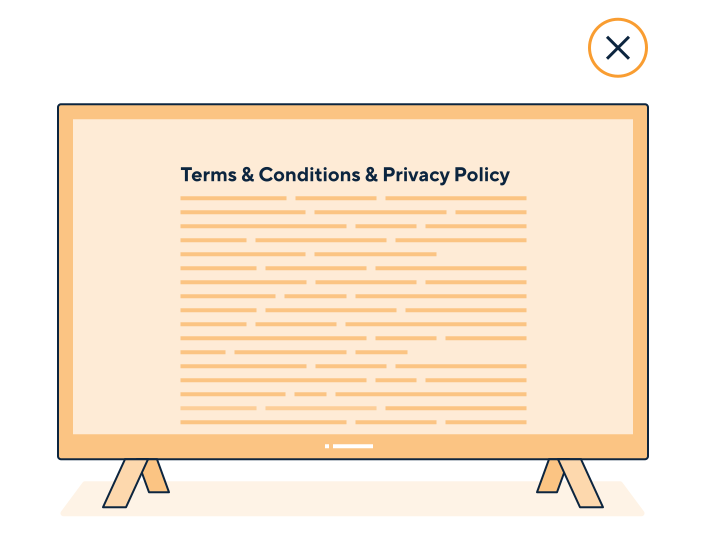
A graphic shows a smart TV displaying a privacy policy and terms and conditions. It bundles them in a large block of text without headings or navigational aids.
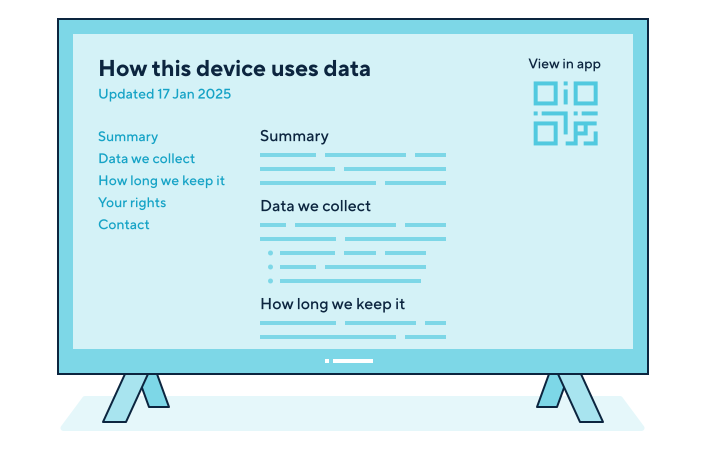
Two examples of smart TVs show on-screen privacy information. The first shows privacy information with a navigation panel for different sections of the document and a clear heading for each section. It provides a short summary at the top.
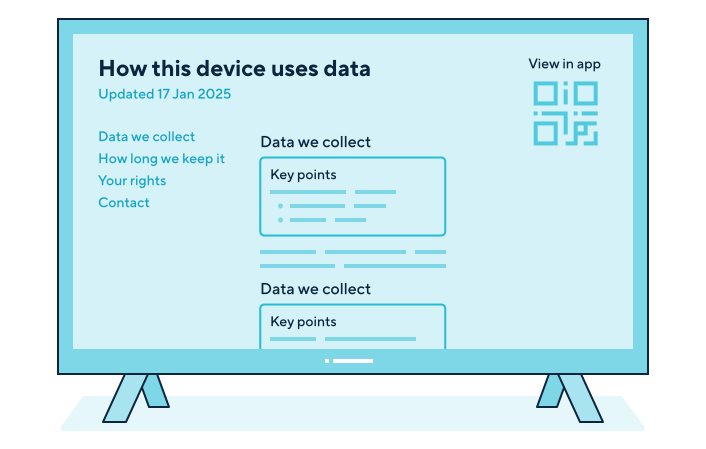
The second shows privacy information with a navigation panel for different sections of the document and a clear heading for each section. Each section contains a text box with key points for users to take away.
Both examples contain a QR code so users can scan and view the privacy information on their mobile if preferred.
What are the right moments for us to provide privacy information?
Timing is important. You should identify the moments when people might expect to make decisions about their personal information, and when they might be ready to make reasonable, informed choices.
Consider when in the user journey you should discuss privacy. You must provide privacy information at the time of collecting personal information from the person it relates to, but you should consider other moments too.
You could consider providing privacy information at the different moments in the user journey. For example, when a user:
- visits a product website;
- downloads an accompanying app from an app store;
- sets up a product for the first time;
- creates or adds user accounts;
- receives a security update that changes how you process their personal information;
- receives a product update that changes how you process their personal information (eg launching a new feature);
- enables a product feature themselves; and
- has their personal information collected by the product.
Often, your IoT product may start processing people’s personal information:
- during set-up (eg if the user gives you personal information as part of this process); or
- once set-up is complete and the product starts working.
You should provide privacy information at least at these moments in the user journey.
However, in some instances, users will not turn on all the features of the product at this time or you add new features that are not covered by the privacy information they’ve already interacted with. This means you might only start certain types of processing later.
You should consider how to provide privacy information then. For example, you could use a just-in-time notice or refer people to your privacy policy.
Example
A design team at a smart security camera manufacturer must ensure they explain what happens to people’s information. They are considering at what moments during the user journey they start processing users’ information. They identify that the smart security camera can start processing different personal information at different times.
For example, the smart camera processes some information as soon as the product is set up, but it would only start processing biometric information from facial recognition if the user turned it on. Users can turn on this feature any time, not just at the product set-up.
The design team decide to provide privacy information in the step-by-step instructions during initial account sign-up, and to deploy ‘just in time’ notice when users turn on additional features, including facial recognition.
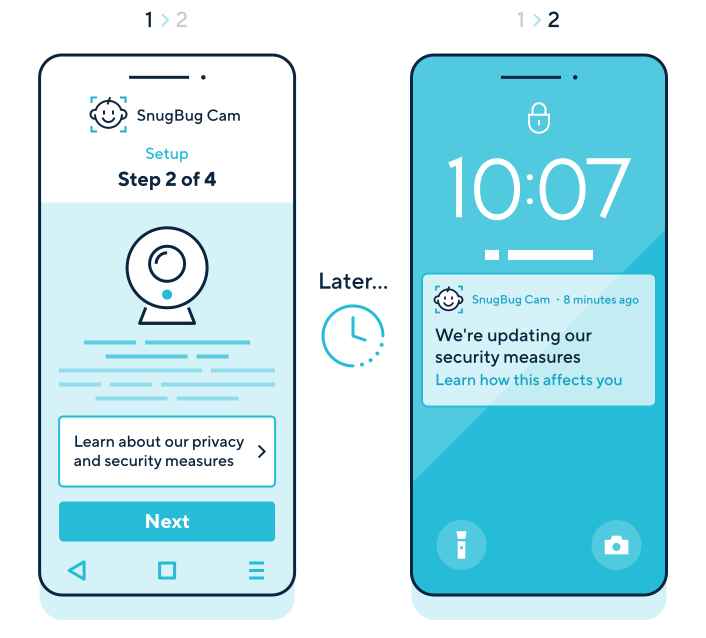
A graphic shows the set-up of a smart baby monitor. The users were shown a link to more information about the product’s privacy and security measures, which they could choose to interact with. A few weeks later, the baby monitor is due a security update that will change how some of the users’ personal information is processed. The users receive a notification on their mobile phone about the security update. They can navigate to a page that explains the changes.
The right moments may vary for different people with different needs.
Whatever moments you choose, you should ensure people have enough time and knowledge to consider the information fully.
How do we provide privacy information on different product interfaces?
When you think about how to provide privacy information, you should consider how your users interact with your IoT product.
This is particularly relevant for IoT products that have different types of interface. For example:
- Will your users interact with your product through a display?
- Does your product involve the use of an associated mobile app?
IoT products can have different types of interface. They include small and large screens, voice and sound interface, light controls, mobile or app interface, or a web browser interface.
You should plan for what privacy information you can make directly available on the IoT product and what information you will make available on a mobile app (if there is one) or through an account accessed through a web browser.
Some devices have a prominent voice interface and a far less prominent display interface. You could consider making privacy information available through the voice interface, in addition to other methods.
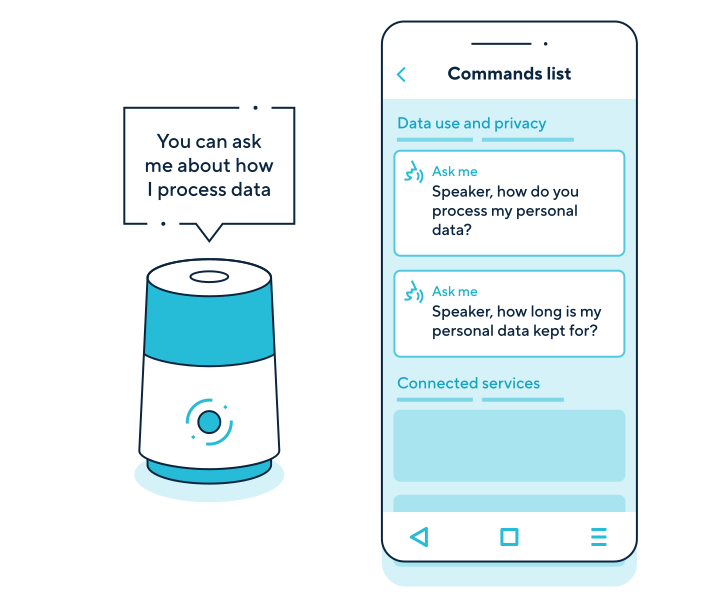
A graphic shows a smart speaker answering users’ questions about how their personal information is processed via its voice interface.
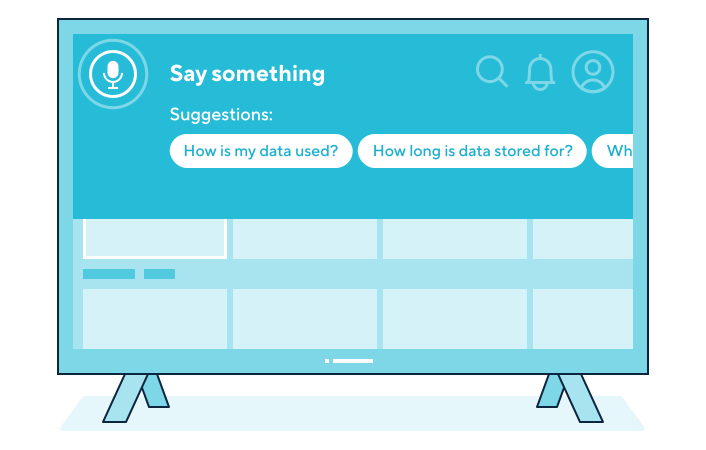
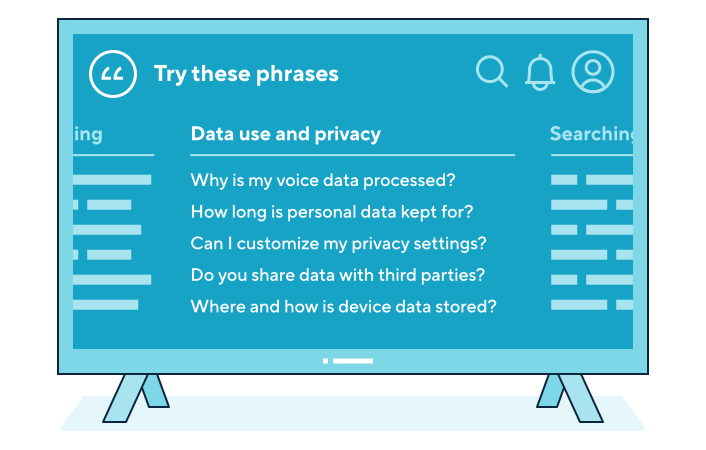
Two graphics show smart TVs using a smart assistant’s voice interface to provide privacy information about how users’ personal information is processed.
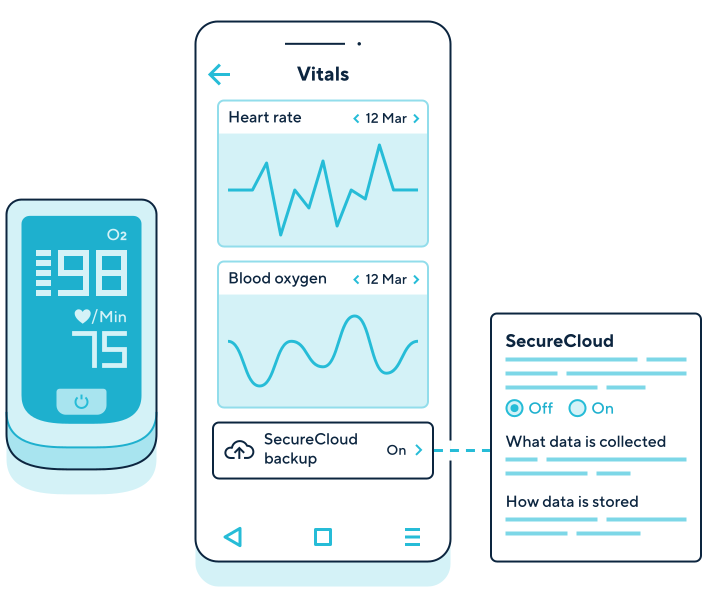
A graphic shows a smart oximeter and its accompanying app displaying privacy information about the cloud back-up setting being on. After users click on the cloud setting, they are presented with more information about what data is collected and stored on the cloud. The oximeter doesn’t have an on-device screen that would allow it to show information in this way.
Some IoT products have prominent light controls and sound interfaces. You could use these methods to signal to your users when IoT products are on and processing personal information.
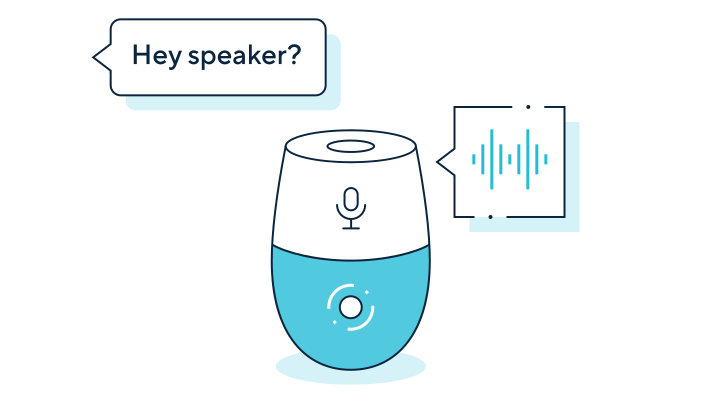
A graphic shows a smart speaker making a sound when it starts ‘listening’ after being prompted by a user.
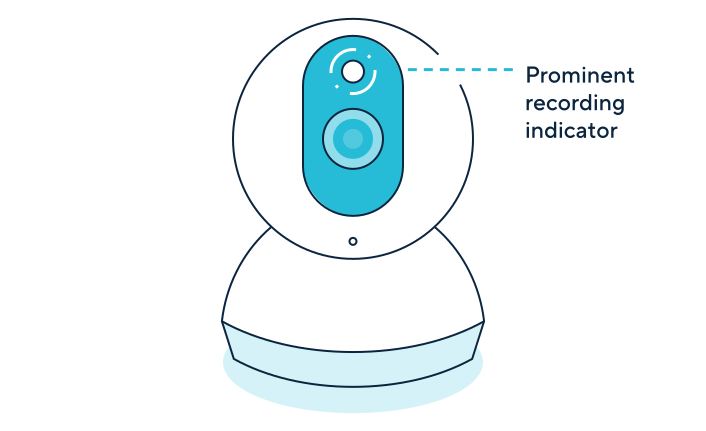
A graphic shows a smart security camera indicating a camera light being on when recording video footage.
How do we provide privacy information if there are multiple users?
An IoT product can often be used by multiple people. Whether you intentionally design your product for use by multiple users or not, you must ensure all potential users whose information you will process are given privacy information.
This may be difficult if users don’t have their own account. You should consider giving people the option of having multiple accounts for a product if this is likely to improve their experience and access to privacy information.
If you are giving users multiple accounts, you should make sure privacy information is easy to find for everyone that has an account, not just the primary account holder.
In situations where users don’t have their own account or don’t want to create one, you should find other ways of giving them privacy information.
This could include providing privacy information:
- on the accompanying app’s app store page;
- directly through the product’s interface, such as screen or a speaker; or
- on any product listing, prominently next to the product description.
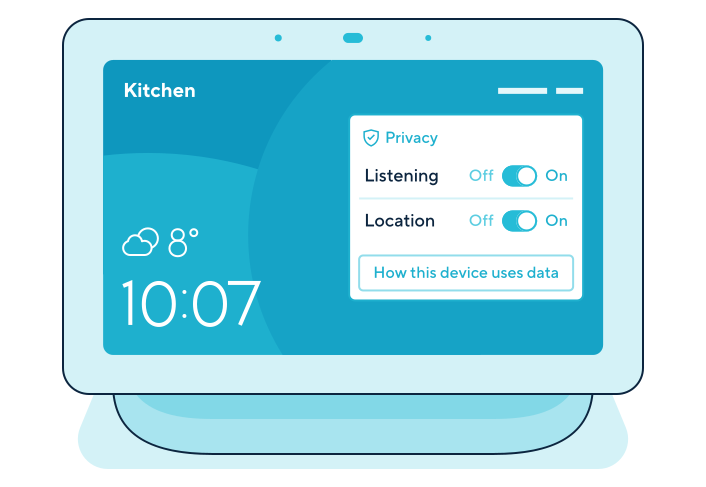
A graphic of a smart home hub shows a dashboard with privacy settings allowing any user, registered or unregistered, to manage controls for sharing certain personal information, including location and whether the home hub’s voice assistant is listening. Any user can access privacy information about how the home hub uses personal information.
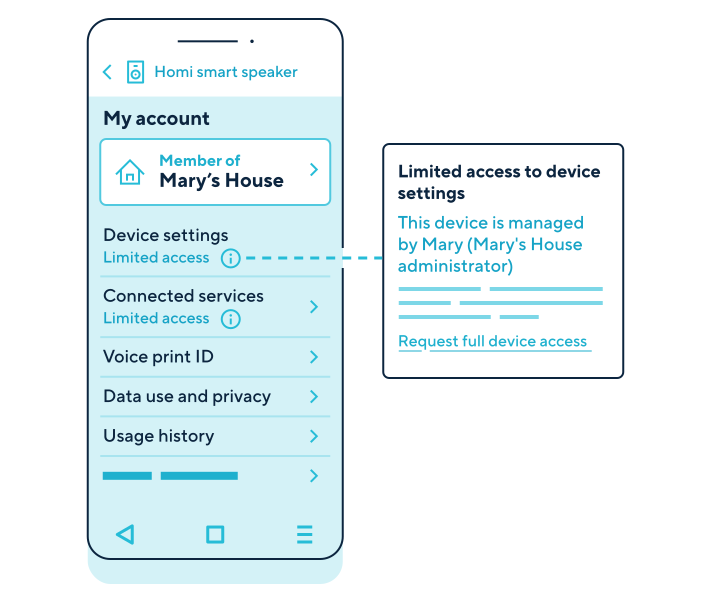
A graphic shows a smart speaker’s accompanying app indicating what product controls are available to an additional user. The additional user is made aware they have limited access to change device settings or to make decisions about what connected services they can control. They can manage their voice ID and view their usage history. They can also view information about how the smart speakers use personal information and privacy.
You should also provide:
- visual reminders on the product or in the app which users use to access the IoT product’s functions and information;
- visual reminders of other products (such as laptops, tablets, mobile phones) accessing the IoT product’s account;
- visual indicators of “side-integration” with other IoT products and what information and product functions are being shared; and
- records of which user used or accessed the IoT product, what function and when (eg accessing a security camera’s live feed).
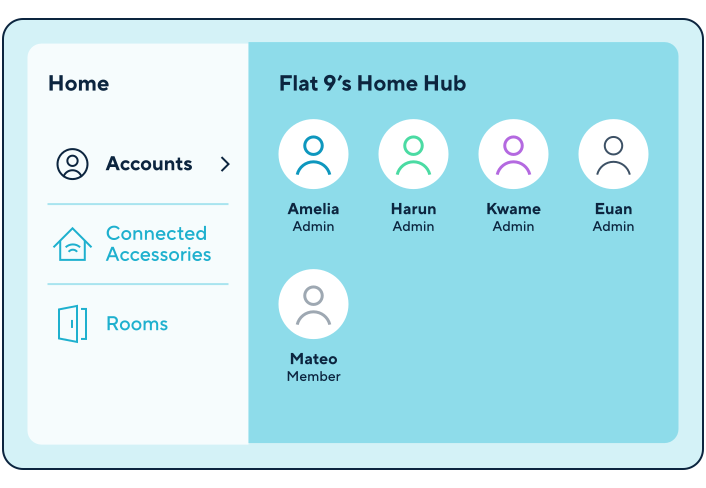
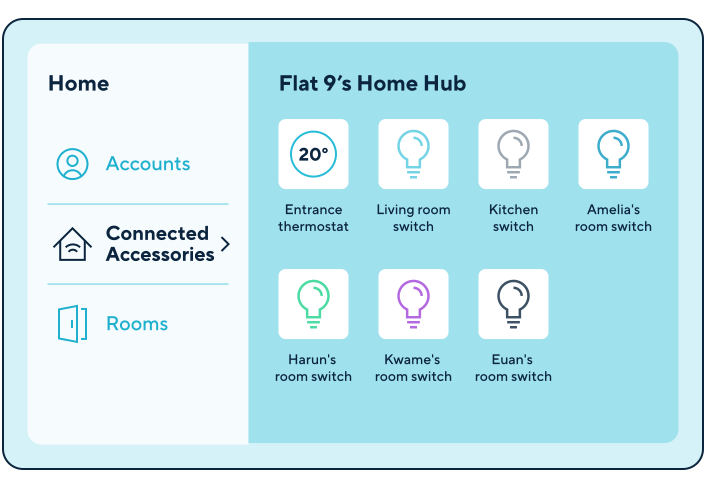
An organisation creates a home hub device that is used in a flat-share. The first screen displays all the accounts of people that have access to the home hub's functions and information from their own devices. Home hub shows five accounts, four of them have admin privileges and one of them is a member with more limited privileges.
The second screen displays side-integrations with other IoT products in the same flat. The home hub is connected to a thermostat and light switches in the living room, kitchen and four bedrooms. This information is available to all home hub account holders.
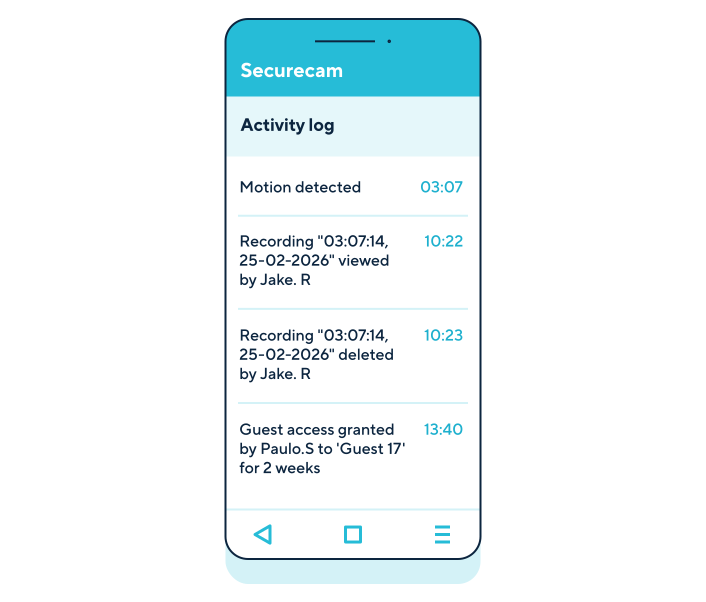
A graphic shows a mobile screen with an accompanying app for a smart security camera used by Jake and Paulo for their front door. The screen displays an activity log for the camera, including when sensors activated motion detection, who viewed and deleted the camera recording, and when. The screen also shows that Paulo granted guest access to a ‘guest’ for two weeks.
Further reading
- Principle (a): Lawfulness, fairness and transparency
- Accountability framework – transparency
- Children’s code – see standard 4 for how to provide information in an accessible and easy-to-understand way
- Right to be informed